Start for free
Personal & household finances · private

Your space to keep clear accounts, without spreadsheets.

Income, expenses, budgets, savings and goals in one place, with your car, home and subscriptions under control. You choose what to use, and only you can see your data.

Start for free → Try the demo
No card needed · The Free plan never expires · Data in the EU
0 €
to get started
100%
of modules on the Free plan
3
languages
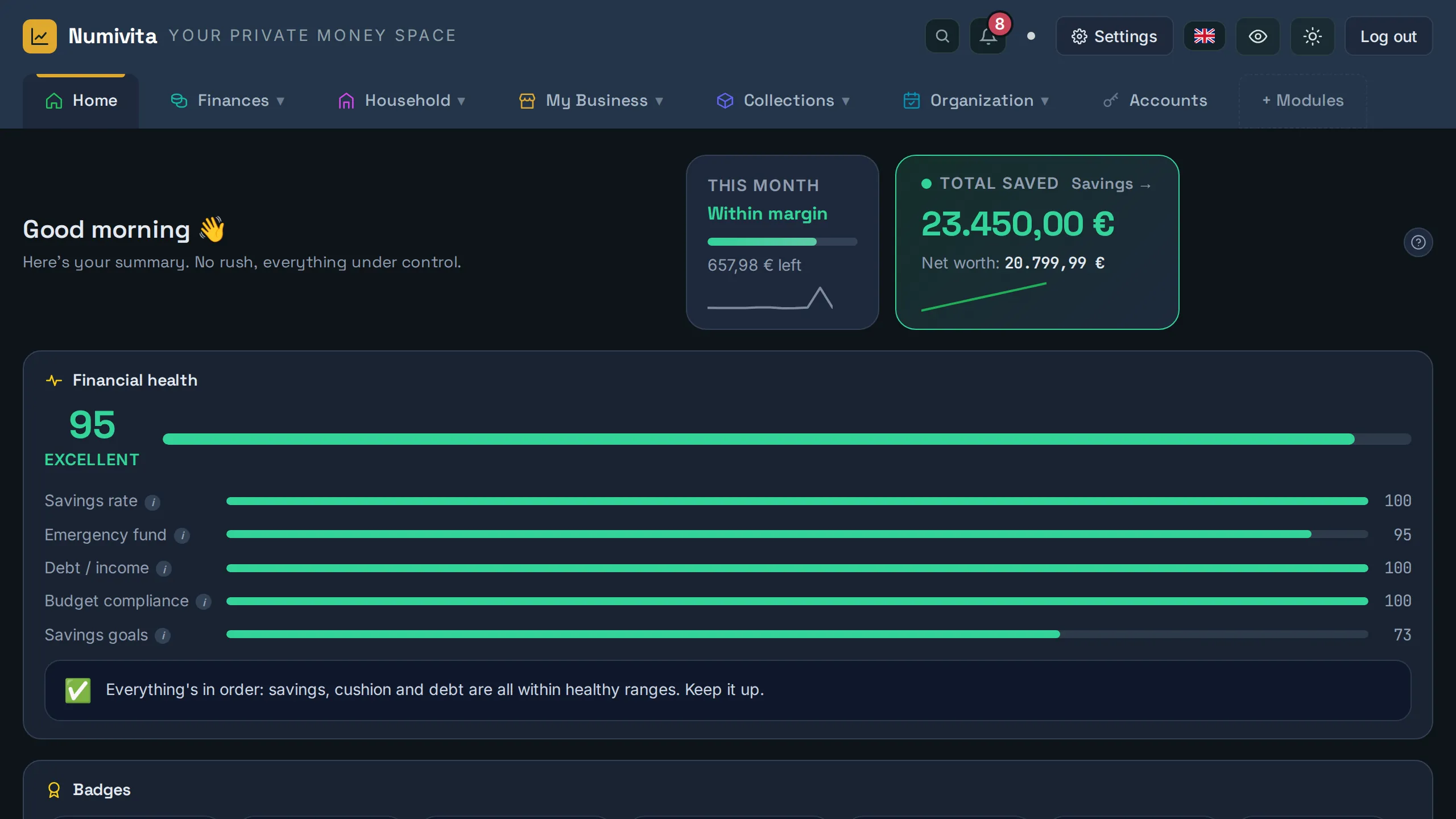
Screenshot of the Numivita Home screen, showing financial health, savings goals and total saved Enlarge
Passwords encrypted with AES-GCM Your data, isolated per account Installable as an app (PWA) Hosted in the EU (Supabase) Available in Catalan, Spanish and English

See it in 2 minutes

A quick tour of the app, with sample data.

Everything you need, in one place

Enable only the modules you need from Settings — the rest stays hidden.

Expenses & budgets

Your own categories, budgets with alerts (and what you don't spend can roll over to next month), shared expenses and a yearly summary that builds itself from each month.

Savings & income

Monthly flows, bank and investment accounts, loans with an amortization planner, real-time quotes for companies you follow, and a month-by-month cash-flow forecast that knows when subscriptions renew and loans end.

Goals & wishlist

Mark them as achieved automatically based on the source you choose: an account, cash, or manual progress.

Subscriptions, analytics & reports

Every recurring fee with its real cost, charts of where your money goes, and monthly and yearly reports you can export to PDF and Excel.

Household: car, home & calendar

Car costs and fuel consumption, home bills, due dates and renewals on a calendar, and tasks with priorities.

Password manager

A credentials vault with real AES-GCM encryption and a master key only you know.

And more, if you need it: My Business Collections that count in your net worth Books (with ISBN scanner), movies & games Inventory with warranties & receipts, and 3D printing

What do you want to achieve?

Pick where to start: the app opens with the modules you need, and you can turn on the rest anytime.

Get started in 3 steps

In five minutes you'll have this month in. No bank connection, no spreadsheets.

1Create your accountWith your email or Google. No card: the Free plan never expires.
2Choose what to trackThe setup assistant asks your goal and turns on only the modules you need.
3Add your first monthYour salary, big expenses and subscriptions. The yearly summary, charts and forecast build themselves.

A look inside

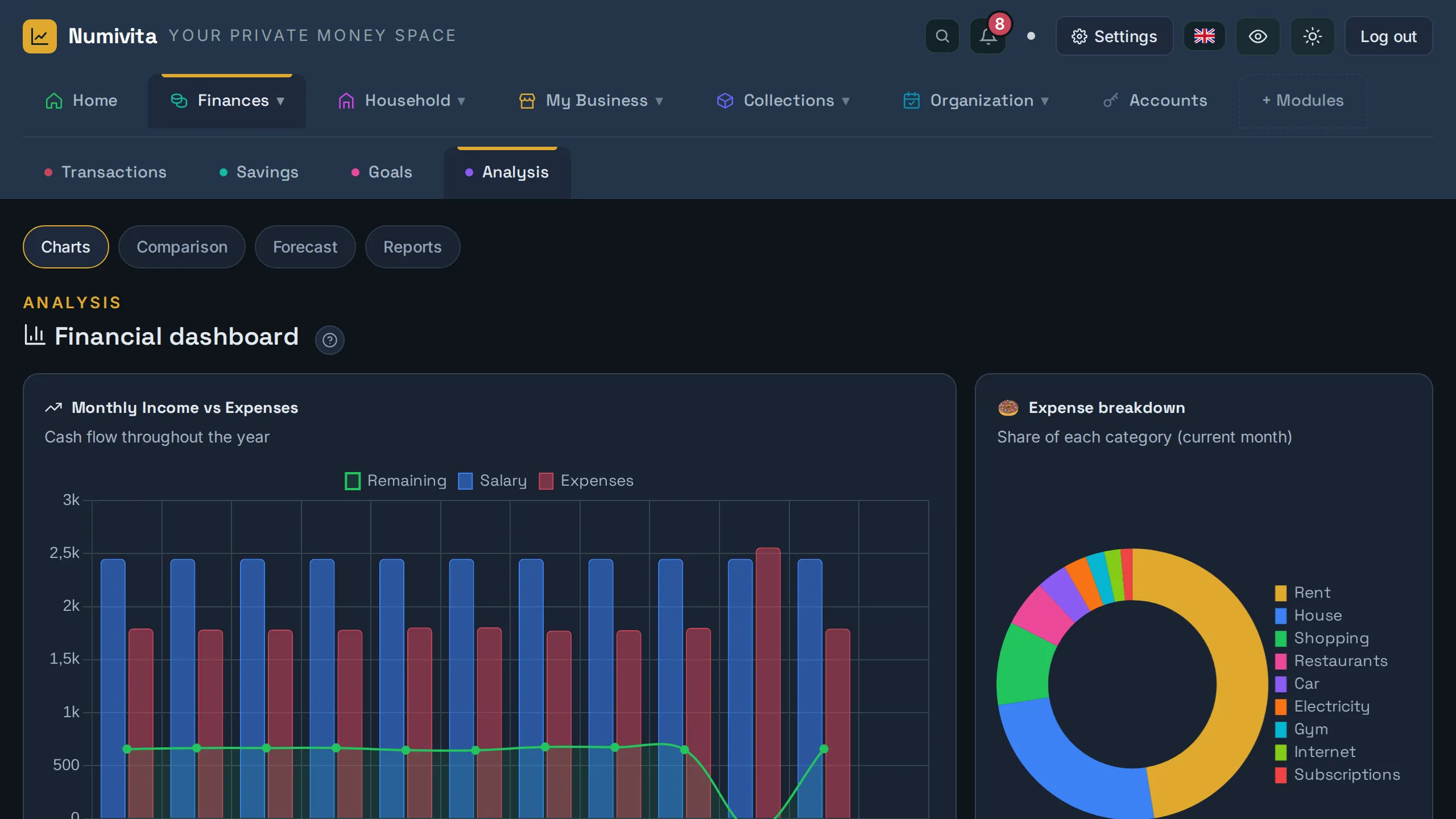
The Analytics dashboard: income vs. expenses for the whole year and where your money goes, calculated for you.

Screenshot of Numivita's Analytics dashboard, with the monthly income and expenses chart and the breakdown of expenses by category Enlarge

Your data, and only yours

Numivita is a tool to get organised, not a data business.

Hosted in the EUOn Supabase, always over an encrypted (HTTPS) connection.
Isolated per accountThe database never lets a user read another user's data.
Passwords encrypted in your browserWith AES-GCM and a master key that is never stored: not even we can read them.
No ads, no trackingWe don't sell your data or use tracking cookies.
Export or delete it anytimeA full copy in one click, and account deletion from Settings — no need to ask anyone.
Privacy modeHide every amount with one click on the eye icon to show your screen or take screenshots without revealing numbers.
Read the privacy policy →

A plan for every stage

All tabs and modules are free for everyone from day one. The Pro plan removes the limits and unlocks specific features.

Free
0 € forever
To start getting organized, no rush
  • ✓ All tabs and modules
  • ✓ Up to 3 accounts
  • ✓ Up to 10 categories per module
  • ✓ 3 active goals at a time
  • ✓ History for the current year
Start for free
Pro Monthly
5,99 € /month
Cancel anytime
  • ✓ Unlimited accounts, categories and goals
  • ✓ Full unlimited history
  • ✓ Custom tabs and fields in My Business
  • ✓ Invoices and quotes in PDF
  • ✓ Full export (Excel/PDF)
  • ✓ Upload your own photos (up to 100 MB)
Try Pro
Pro Yearly
49 € /year
~30% savings vs. monthly
  • ✓ Everything in the Pro plan
  • ✓ Equivalent to €4.08/month
  • ✓ One payment per year
Try Pro Yearly

✓ No card to start · ✓ Cancel anytime · ✓ Data in the EU · ✓ 14-day refund

You can enable or disable any tab from Settings, with either plan.

FAQ

Can I use only some of the tabs?

Yes. From Settings you can enable or disable each module individually — if you only need to track expenses, hide the rest.

Who can see my data?

Each account is completely isolated from the others: your data is stored tied to your user and never mixed with another account's. Vault passwords can also be encrypted with a key only you know.

Does it work on mobile?

Yes, it's responsive and, with the «Install the app» button, it sits on your home screen like any other app. On your phone you can also scan the barcode of books and collection items with the camera.

Can I export my data?

Yes, anytime and on any plan: a full copy in one click. With the Pro plan, also to Excel and PDF. Your data is always yours.

What happens if I cancel the Pro plan?

You go back to the Free plan without losing any data: the free plan's limits simply apply again (for example, only the first 3 accounts are shown).

Can I get a refund?

Yes. If it is not for you, we refund the full amount within 14 days of your first payment — just email support@numivita.com. Details in the Terms and Conditions.

Who is behind Numivita?

Numivita is an independent project, not a big company. If you email support@numivita.com, the person who builds it replies — not a bot.

How is Numivita funded?

Through the Pro plan, and that's it. No ads, we don't sell or share your data, and we take no commissions from banks or financial products. The Free plan exists because people who need more pay for Pro.

What's new

Numivita gets better every week. Here's the latest we've added.

Your main account tells you what you have left

At the top of Savings, «Left now» shows your main account balance: the balance entered at the start of the month, plus the salary and Bizums you receive, minus this month's expenses. Enter your salary once and it repeats every month; if it arrives a few days early (for example, December's on 29 November), choose the pay day and it will count from that day. New: transfers between accounts (for example, from Trade Republic to your bank), which take money from one account and add it to the other without counting as income or expense. Income now only shows what comes in each month; balances (accounts, cash, vouchers) are in Savings. In Income, each income source can have the account the money goes into, and it is added to its balance.

A simpler menu and help for your first days

Finances now has 4 sections: Transactions (where your day-to-day goes: what you earn, what you spend, budgets and subscriptions), Savings, Goals and Analysis. New accounts get a short explanation in each section with a button to get started, a menu tour after the welcome, and first steps on Home that take you straight to the right place. To see it again, go to Settings → General. Buttons use line icons instead of emojis.

Your trips on a map

New Travel module (in Collections): log where you went, when and some notes (places, food...) and the places turn green on a world map. The United States is split into states; Spain, into autonomous communities; France, Italy and England, into regions; and Germany, into states. Islands and far-off territories, like the Canary Islands or Hawaii, count separately. You can drag the map around and zoom with your mouse wheel. Turn it on from "+ Modules". On the Free plan, up to 5 trips.

Start keeping clear accounts today

Free forever to get started · No card needed · Data in the EU

Create your account →